Uncover the Power of Co-Pilot in Microsoft Clarity: The Ultimate Web Insight for Driving Business Growth
Table of Contents
How To Set up Microsoft Clarity and Co-Pilot: The difference between great and mediocre web performance can be one of the deciding factors that propels your business forward—or leaves you trailing in the wake of more digitally savvy competitors. Enter Microsoft Clarity’s Co-Pilot 💪💪💪—an AI tool that’s revolutionising the way businesses understand and optimise their web presence.
Ensuring Every Click Counts: How To Set up Microsoft Clarity
Let’s start with the juicy AI component first. Co-Pilot is a cutting-edge AI assistant that helps businesses untangle the web of user interactions on their websites, offering smarter insights that go beyond mere data points and charts.
It enables marketers and business owners to make informed decisions backed by in-depth knowledge of customer journeys and user experiences. Illuminating the ‘what,’ ‘where,’ and ‘why‘ behind every click and scroll.
Stop Guessing and Start Knowing: Copilot’s Unique Features
Like me, Marketers often rely on guesswork and general trends to optimise web performance, but Co-Pilot offers a more precise, tailor-made approach. It combines a suite of features, including session recordings, heatmaps, and AI-powered insight cards, to help users grasp the finer details of their audience’s online activities.

Peeling Back the Layers: Analyse Your Audience’s Digital Behavior
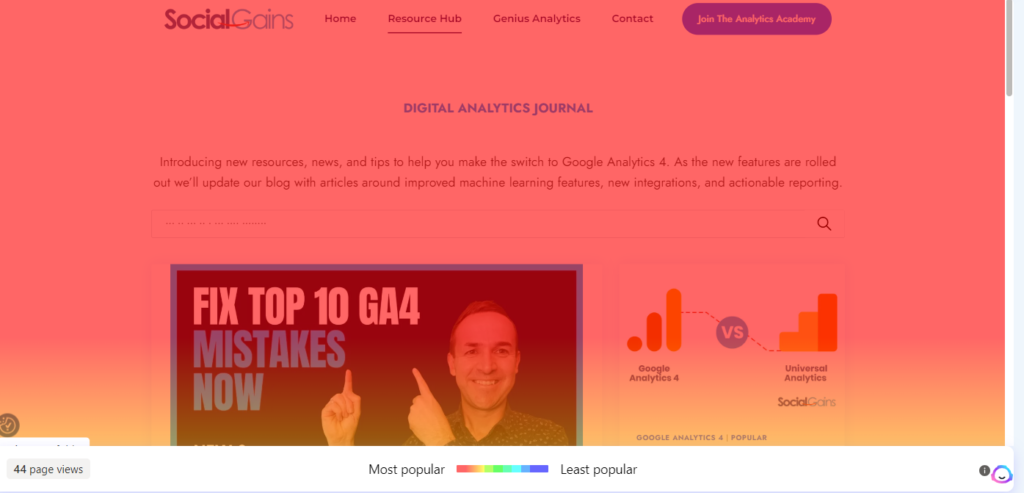
Google Analytics 4 can be limiting, but Copilot shines a spotlight on individual user sessions. Session recordings give marketers a front-row seat to the user experience, revealing what truly captures and holds visitors’ attention. Heatmaps further dissect on-page interactions, highlighting where visitors are clicking, how far they scroll, and what might be overlooked.
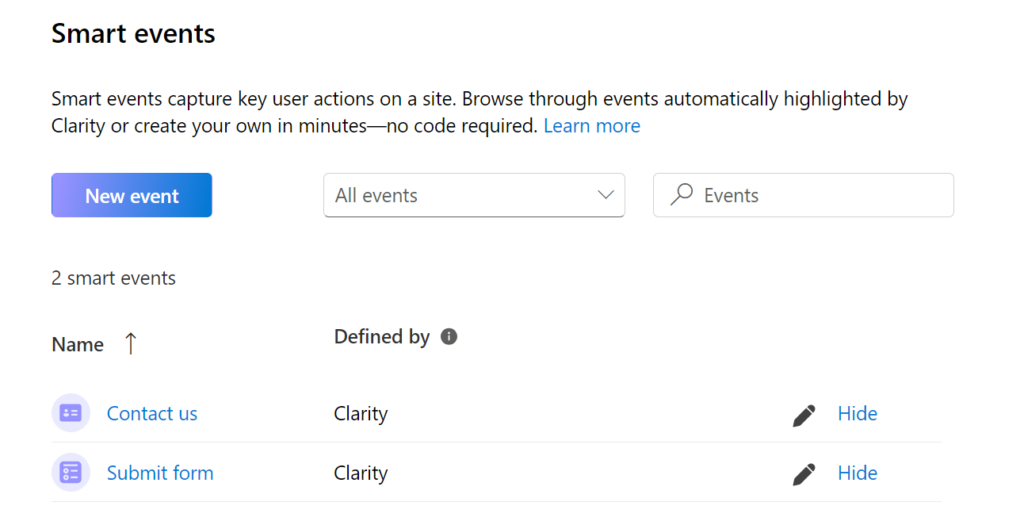
Clarity enables you to quickly view “Smart events“. Smart events track key user actions on your website, making it easy and fast for you to view the data that matters. Clarity automatically defines smart events for you, and/or you can customise them or define new events – all code-free.
Actionable Insights at a Glance: The Power of Copilot’s AI Insight Cards
With Copilot’s AI Insight Cards, you get instant access optimisation opportunities. These cards are like having a digital marketing consultant always on call, pointing out specific areas of improvement, such as excessive load times or a design element that might be driving users away. It’s flagged a couple of issues on my website as you can see below.

Looking Forward by Looking Back: Predicting Trends from User Behavior History
By analysing historical data, Copilot can forecast trends in user behavior, allowing businesses to stay ahead of the curve. This enables proactive optimisation, ensuring that websites are always a step ahead in catering to evolving user needs and expectations.

Future-Ready Performance: Anticipating and Addressing Emerging Issues
Copilot’s alert system notifies users about anomalies and performance declines in real-time. Whether it’s a spike in exit rates or a sudden drop in engagement, these insights enable timely intervention, addressing problems before they escalate and affect the bottom line.
Real-world Success Stories: How Co-Pilot Propels Businesses to New Heights
Offering features is one thing, but Copilot’s true value lies in its impact on real businesses. Consider the rapid growth of Parvis Invest Inc. upon integrating Co-Pilot into their Clarity toolkit.
Crest Pharmacy: A Case Study in Enhanced Web Performance
When a new pharmacy group client joined Social Gains, they highlighted a significant issue impacting revenue growth – the low number of online bookings for their primary services.
Despite decent daily organic traffic, low-volume users were completing the online form. Even after extensive testing by in-house web developers, the root cause couldn’t be isolated to resolve it.
Using Clarity
To tackle this, the team at Social Gains used Clarity for detailed analysis, tracking user segments for specific URLs. In just hours, they pinpointed a specific problem with Android devices, which accounted for over 30% of all users. Clarity screen recordings showed users could only proceed up to step two on the form when using an Android device.

This insight revealed a significant revenue loss running to 5 figures weekly, as hundreds of Android mobile users gave up booking out of frustration.
Strategy and Implementation
This finding from Clarity was crucial in fixing the issue and preventing further financial losses for their pharma client. Actions Taken Social Gains used a variety of Clarity features to find, explore, and rectify the problem for their client:
1.) Session grouping summaries generated by CoPilot’s AI-powered insights and identifying top website user paths to reveal and resolve bottlenecks
2.) Segmenting users by device (Android) with dashboard insights
3.) Adding a filter to pinpoint dead clicks causing poor user experience
Tangible Results
The changes driven by Copilot bore fruit. Crest Pharmacy witnessed a 30% increase in average engagement times, a noteworthy 25.7%% decrease in bounce rates, and a huge 30.5% increase in conversions. These metrics not only showcase the power of Co-Pilot’s insights but also demonstrate how proactive web optimization can lead to tangible results.
Step-by-Step Setup Guide: Empower Your Team with Co-Pilot
Excited to experience the game-changing capabilities of Co-Pilot? Here’s how you can set it up within Microsoft Clarity, ensuring your business is equipped to make smarter, data-driven web decisions.
Step 1: The Microsoft Clarity Sign-up
To begin your Co-Pilot journey, sign up for Microsoft Clarity and link your website to the platform. Clarity’s user-friendly interface makes this step a breeze, allowing for an easy integration process.
If you already have a Microsoft account, you can sign in. If not, you can sign in with Facebook or Google.
When you log in, you’ll be asked to begin a new project and enter a website URL. Remember to name your project descriptively for easier organization of your analytics data in the future..

Step 2: Select How You Want To Install Clarity
You can install Ms Clarit by logging in to Google tag manager or manually using a tracking code.

Step 3: Generate Your Clarity Tracking Code
If you’re not using Tag Manager, click on “Get tracking code” to receive a unique code. Integrate this code into your website to start collecting data.
Step 4: Installing Your Clarity Tracking Code
Copy the Code: From your Clarity dashboard, copy the tracking code snippet provided. This code contains a unique identifier for your project.
Integrate Code into Website: Access the source code of your website. This can usually be done through your content management system (CMS) or by directly editing your HTML files.
Paste the Code: Find the <head> section of your website’s HTML and paste the tracking code snippet just before the closing </body> tag.
Verify Installation: Save the changes and publish your website. To ensure the tracking code is working correctly, you can use browser developer tools to inspect your website’s source code. Look for the Clarity code snippet to confirm successful integration.
Data Collection: After a few hours or days, depending on your website’s traffic, Clarity will start collecting user behavior data. You can access this data from your Clarity dashboard and begin exploring insights to optimize your website.
Step 5: Co-Pilot Activation
Once within Clarity, accessing Co-Pilot is straightforward. Look for the Co-Pilot option within the dashboard, and with a single click, you can begin exploring the depths of user interactions in ways never before possible.
Step 6: Setting Up The Clarity Integration With GA4
I recommend integrating Microsoft Clarity with Google Analytics 4. Google Analytics gives you the numbers, Microsoft Clarity shows you the story behind them. Visual representations bring data to life, enabling businesses to understand user behaviour better.

- Navigate to the Integration Page in Microsoft Clarity:
- Click `Get Started` under the Google Analytics integration section.
- Proceed with Google authentication, selecting an existing account or opting to `Use another account`.
- Set Up the Connection:
- In the dialog box, choose your web property to share data with Clarity.
- If your site is listed, select it and click `Save`. If not, enter your site details manually.
- Access Enhanced Data:
- After integration, a new Google Analytics tab will appear in your projects.
- Clarity adds a unique dimension to Google Analytics, with a URL for each page session linked to Session Recordings and Heatmaps.
Step 7: Exploring the Tools
Familiarise yourself with the all tools Microsoft Clarity and Co-Pilot offers. From session recordings to heatmaps to AI Insight Cards, each tool provides a unique vantage point in understanding your website’s performance and user behavior.
The Co-Pilot Advantage: Charting Your Course to Online Success
In a sea of digital options, Co-Pilot shines as the top guide for businesses aiming to boost their web presence. With its mix of cutting-edge tools and insightful data, it offers a clear look at user behaviour. Plus, it helps businesses make informed choices to increase revenue and improve the online experience for their audience.
Unlock the Power of Co-Pilot in Microsoft Clarity Today
Don’t just monitor your online performance—control it. With Co-Pilot in Microsoft Clarity, you’re not just fixing issues; you’re steering your business towards its full potential.
Whether you’re a marketing manager craving deeper insights or a business owner eager to ensure every online investment pays off, Co-Pilot is the tool that turns web analytics into web actions. Start your Co-Pilot adventure now, and witness how empowering understanding can transform your digital landscape.
If you want advanced insights on how to set this up alongside GA4 then shoot me an email to drew@socialgains.co.uk. We’ll set up the correct segments to track the performance of your various channels and ensure your smart events are set up correctly.
FAQS
How does Microsoft Clarity track session inactivity?
A: Clarity tracks session activity and considers a session inactive after 10 minutes of no user actions. However, it will continue to track users who return within 30 minutes of inactivity.
Is Clarity better than Hotjar?
A: Clarity and Hotjar offer similar functionalities, but choices between them depend on specific needs and preferences. Clarity may be preferable for those already invested in the Microsoft ecosystem.
How do I use Microsoft Clarity for SEO?
A: You can leverage Clarity’s insights by analyzing user behavior to make SEO improvements, such as identifying the content that keeps users engaged and optimizing the user experience for better search engine rankings.
What user data protection measures does Microsoft Clarity implement?
In addition to adhering to GDPR regulations, Clarity allows website owners to mask sensitive data, ensuring that personal information is not captured during session recordings.
How does MS Clarity enhance your Analytics journey?
By integrating Clarity’s behavioral data with traditional analytics, you can obtain a holistic view of user engagement and make data-driven improvements to your website.